
Sales are scattered across spreadsheets
Partners, offers and agreements live in different Excel files that no one updates the same way.
CRM ASAP connects partner records, sales opportunities, responsible employees, activities and documents. The team always knows what was agreed, who owns the sale and what comes next.
Next action
Product presentation
Tomorrow · 10:00 AM · Jelena Petrović
Built for owners, sales reps and sales teams who want a clear overview
The problem isn't a lack of data
When information stays in spreadsheets, private messages and notes, a sale depends on one person's memory instead of a clear process.
Partners, offers and agreements live in different Excel files that no one updates the same way.
An important call, comment or document is hard to find when a decision needs to be made or a sale needs to be taken over.
An offer was sent, but it's unclear who should follow up with the partner, when, and about what.
Partner profile
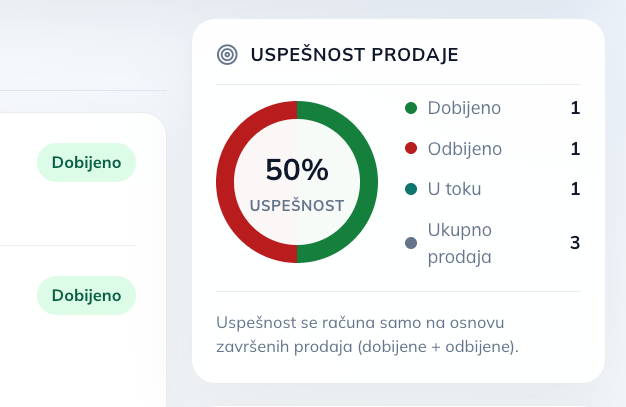
The partner screen brings together basic information, contact details, the collaboration history, all sales, products and performance metrics. The partner rating shown in the hero section is calculated from the actual ratio of won and lost sales.
68%
17
6
24 days
'/%3E%3Cg fill='%23fff' fill-opacity='.1'%3E%3Crect x='80' y='70' width='1280' height='820' rx='36'/%3E%3Crect x='130' y='180' width='340' height='610' rx='28'/%3E%3Crect x='520' y='180' width='790' height='190' rx='28'/%3E%3Crect x='520' y='420' width='370' height='370' rx='28'/%3E%3Crect x='940' y='420' width='370' height='370' rx='28'/%3E%3C/g%3E%3Cg fill='%237dd3fc'%3E%3Crect x='150' y='120' width='270' height='28' rx='14'/%3E%3Ccircle cx='1260' cy='130' r='18'/%3E%3C/g%3E%3Cpath d='M570 710l80-100 65 50 85-125 55 48' fill='none' stroke='%2338bdf8' stroke-width='18' stroke-linecap='round'/%3E%3Ccircle cx='1125' cy='605' r='110' fill='none' stroke='%23a78bfa' stroke-width='28' stroke-dasharray='420 270' transform='rotate(-90 1125 605)'/%3E%3C/svg%3E)
Rating based on sales win rate
Sale detail
Clicking a sale opens a dedicated screen with the product, status, responsible employees, documents, notes, actions and a complete timeline.
After every action the CRM reloads the current state, so the team always continues working with the latest data.
CRM capabilities
Every offer or sales opportunity is tracked separately, alongside the same partner overview and collaboration history.
Assign one or more employees and always see who owns a specific sale.
Schedule, reschedule, complete or cancel the next step without extra reminders outside the CRM.
Status changes, activities, comments and decisions stay ordered chronologically in a single timeline.
Materials the team needs stay linked to the specific sale instead of living in private folders and chats.
Coordinates can be part of a sale whenever the partner's or meeting's location matters for the work ahead.
Sales timeline
From creating the sale to a won or lost outcome, every important change stays in chronological order. A new team member gets up to speed quickly, without digging through messages.
Today at 9:12 AM · Nikola
The partner and product are linked to the new sale.
Today at 9:18 AM · Marija
Jelena Petrović now owns the next steps of the sale.
Today at 11:40 AM · Jelena
The partner is requesting the final offer and a presentation date.
Tomorrow at 10:00 AM · Jelena
Online product presentation and agreement on the next step.
A simple sales process
For a new sale you only pick a partner and a product. The CRM stores the product data exactly as it was at the moment the sale was created.
The team gets a clear status, ownership and context, with no extra spreadsheet to maintain.
Calls, meetings, comments, documents and rescheduled dates build the chronological history of the sale.
Mark the sale as won or lost, while the complete flow stays available for partner analysis.
One business context
CRM ASAP uses existing ASAP Core data about partners, products, employees, files, coordinates and comments. The sales team doesn't build a new isolated system — it uses the same business context the company already knows.
Izaberite mesečni ili godišnji plan sa popustom
Jedna cena za ceo CRM — partneri, prodaje, timeline i dokumenta.
30 dana besplatno, za sva preduzeća.
Frequently asked questions
CRM ASAP is a module of the ASAP Core platform for running the complete sales process toward a partner. It connects partners, individual sales, products, employees, activities, documents, comments and next actions.
Yes. Every sales opportunity is tracked as a separate sale with its own status, employees, documents, activities and history. All sales are also visible on the partner overview.
A sale can be New, In progress, On hold, Won or Lost. Every status change is recorded in the sale's timeline.
On a sale you can schedule a next action, reschedule it, mark it as done or cancel it. The partner screen shows the next upcoming scheduled action.
No. When a sale is created, the CRM stores a snapshot of the selected product. Later catalog changes do not affect the historical data of an existing sale.
The CRM KPI panel shows the win rate, the number of won, lost and active sales, the total number of sales, the most active products, the average close time and the next action.
In the demo we can walk through an example partner, a new sale, a responsible employee, the timeline and the next action.
No generic presentation — we walk through your company's actual sales flow.